Package Torello.Browser.JsonAST
Class SERIALIZED_AST
- java.lang.Object
-
- Torello.Browser.JsonAST.SERIALIZED_AST
-
- All Implemented Interfaces:
java.io.Serializable
public class SERIALIZED_AST
extends java.lang.Object
implements java.io.Serializable
This class is the primary User-Interaction API class. This class will load the "already parsed" a.k.a. the "already generated" AST Object Instances from the Java-HTML'.jar'File into memory from disk. This class uses the standard JDK Object serialization and de-serialization techniques.If you wish to "play around" and experiment with actual nodes of the classes in theJsonASTPackage, then simply invoke this classesSERIALIZED_AST.deserializeFromJAR()method, and you will have a genuine AST with which you may experiment.
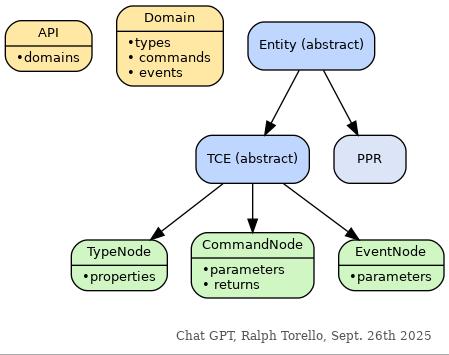
Object-Class Inheritance Tree:
This image portrays the Java Class Inheritance of these objects / classes.
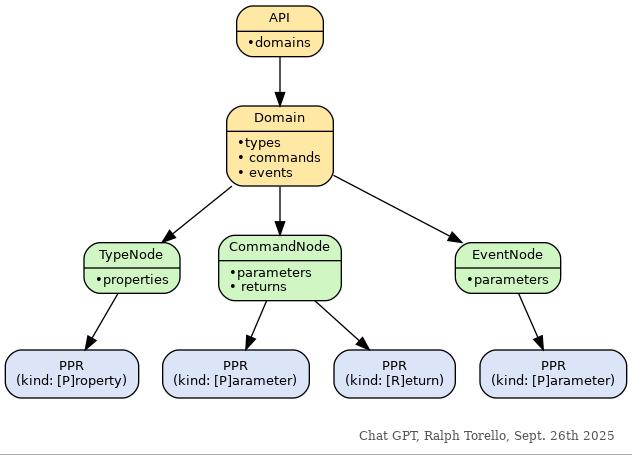
Runtime Instance Container Tree:
This image portrays these objects / classes as containers that hold instances / references of each other.
Loading the AST's from Disk:
The following example code is merely provided here to show what is easy (and hopefully intuitive) when using the two AST's which have been serialized to disk / the'.jar'File.
Again, this package is used internally, and likely has somewhat less value as a public API. If you are interesting in iterating or inspecting (programatically - rather than just looking at the Java Doc for these methods) these domains (packages), classes and methods - then this example portrays the one line invocation for loading the AST's from disk.
Example:
import Torello.Browser.JsonAST.*;

// This class simply loads the seialized AST's from disk (from the '.jar' File).  Afterwards, it
// searches the "JavaScript AST" (There are 2 AST's - 1 per API).
//
// Once it finds the "RunTime" Domain (inside Google Chrome, a "Domain" is similar to a Java
// "Package"), it then finds the "evaulate" method, and prints all 15 of its separate parameters to
// the termainal.
//
// The method "RunTime.evaluate(...)" accepts many parameters, and is the standard mechanism for
// requesting that the browser execute user provided Java-Script, using the browser's Java-Script
// engine.

public class ast
{
    public static void main(String[] args)
    {
        System.out.println("Hello from class ast!");
        SERIALIZED_AST sa = SERIALIZED_AST.deserializeFromJAR();

        for (Domain d : sa.jsAPI)
            if (d.name.equals("RunTime"))
                for (CommandNode cn : d.commands)
                    if (cn.name.equals("evaluate"))
                    {
                        System.out.println(
                            "d.toString():\n" +     d.toString() + '\n' +
                            "cn.toString():\n" +    cn.toString()
                        );

                        for (PPR param : cn.parameters)
                            System.out.println(param.toString());

                        System.exit(0);
                    }
    }
}
- See Also:
- Serialized Form
Hi-Lited Source-Code:- View Here: Torello/Browser/JsonAST/SERIALIZED_AST.java
- Open New Browser-Tab: Torello/Browser/JsonAST/SERIALIZED_AST.java
File Size: 5,729 Bytes Line Count: 133 '\n' Characters Found
-
-
Field Summary
Serializable ID Modifier and Type Field Description protected static longserialVersionUIDData File Name within the Java-HTML '.jar' File Modifier and Type Field Description static StringFILE_NAME_JARThe Java-HTML'.jar'File contains a data-file by this name.CDP Specification Files, Parsed into Abstract Syntax Trees Modifier and Type Field Description APIbrowserAPIThis is an instance field, and after the AST's have been loaded from the'.jar'file, this field will contain the Abstract Syntax Tree for Google's "Browser API" suite of methods, types and events.APIjsAPIThis is an instance field, and after the AST's have been loaded from the'.jar'file, this field will contain the Abstract Syntax Tree for Google's "JavaScript API" suite of methods, types and events.Miscellaneous Facts about the Two AST's, required by the Java Code Generator Modifier and Type Field Description InfoDatabrowserDatThis is some rather boring "facts" about the classes and methods in the AST ("the tree").InfoDatajsDatThis is some rather boring "facts" about the classes and methods in the AST ("the tree").
-
Method Summary
Read the Serialized Data File from the Java-HTML '.jar' File, and Return the Data Modifier and Type Method Description static SERIALIZED_ASTdeserializeFromJAR()Reads bothAPI's(the "Browser API" and the "JavaScript API") from disk, and into Java Memory.
-
-
-
Field Detail
-
serialVersionUID
protected static final long serialVersionUID
This fulfils the SerialVersion UID requirement for all classes that implement Java'sinterface java.io.Serializable. Using theSerializableImplementation offered by java is very easy, and can make saving program state when debugging a lot easier. It can also be used in place of more complicated systems like "hibernate" to store data as well.- See Also:
- Constant Field Values
- Code:
- Exact Field Declaration Expression:
protected static final long serialVersionUID = 1;
-
FILE_NAME_JAR
public static final java.lang.String FILE_NAME_JAR
The Java-HTML'.jar'File contains a data-file by this name. Using standard Java Serialization, both Google's "JavaScript API" and Google's "Browser API" have had their Abstract Syntax Tree's serialized (saved) to disk.
If you don't remember how to load a serialized data-file into memory, there is a simple method in this class which does just that. (SeedeserializeFromJAR())- See Also:
- Constant Field Values
- Code:
- Exact Field Declaration Expression:
public static final String FILE_NAME_JAR = "SerializedAST.dat";
-
browserAPI
public final API browserAPI
This is an instance field, and after the AST's have been loaded from the'.jar'file, this field will contain the Abstract Syntax Tree for Google's "Browser API" suite of methods, types and events.
Remember that all of the public-facing methods & fields in the AST nodes are declared'final'. Any lists or sets present in these nodes have been built with classes from Java-HTML's "Read Only" Package. It is impossible to break, ruin or screw-up these trees. They, and their contents, are perfectly immutable!- See Also:
deserializeFromJAR()- Code:
- Exact Field Declaration Expression:
public final API browserAPI;
-
jsAPI
public final API jsAPI
This is an instance field, and after the AST's have been loaded from the'.jar'file, this field will contain the Abstract Syntax Tree for Google's "JavaScript API" suite of methods, types and events.
Remember that all of the public-facing methods & fields in the AST nodes are declared'final'. Any lists or sets present in these nodes have been built with classes from Java-HTML's "Read Only" Package. It is impossible to break, ruin or screw-up these trees. They, and their contents, are perfectly immutable!- See Also:
deserializeFromJAR()- Code:
- Exact Field Declaration Expression:
public final API jsAPI;
-
browserDat
public final InfoData browserDat
This is some rather boring "facts" about the classes and methods in the AST ("the tree"). This data-field and group of Read-Only "sets" and "lists" exists solely to make the actual code written for the (proprietary, and non-visible) Java-HTML Browser Package Code Generator look a little nicer and a little bit easier to read.
You may review these lists; they aren't that interesting. The contents of theInfoDataare all declared'final'and typed using "Read Only" data-types. They are perfectly immutable, and you cannot "screw them up" or anything like that. 😀😀- Code:
- Exact Field Declaration Expression:
public final InfoData browserDat;
-
jsDat
public final InfoData jsDat
This is some rather boring "facts" about the classes and methods in the AST ("the tree"). This data-field and group of Read-Only "sets" and "lists" exists solely to make the actual code written for the (proprietary, and non-visible) Java-HTML Browser Package Code Generator look a little nicer and a little bit easier to read.
You may review these lists; they aren't that interesting. The contents of theInfoDataare all declared'final'and typed using "Read Only" data-types. They are perfectly immutable, and you cannot "screw them up" or anything like that. 😀😀- Code:
- Exact Field Declaration Expression:
public final InfoData jsDat;
-
-
Method Detail
-
deserializeFromJAR
public static SERIALIZED_AST deserializeFromJAR()
Reads bothAPI's(the "Browser API" and the "JavaScript API") from disk, and into Java Memory. The'API'class is the root node of an Abstract Syntax Treee, or AST. It is just the "Java-ized" variant of the Protocol-API which Google has specified using the two'.json'files:- Returns:
- An instance of this class, with all four data-fields properly initialized.
- See Also:
LFEC.readObjectFromFile_JAR(Class, String, boolean, Class)- Code:
- Exact Method Body:
 // readObjectFromFile_JAR
 // (
 //      Class<?> classLoaderClass,
 //      String f,
 //      boolean zip,
 //      Class<T> returnClass
 // )

 return LFEC.readObjectFromFile_JAR(
     SERIALIZED_AST.class,
     "data-files" + File.separator + FILE_NAME_JAR,
     true,
     SERIALIZED_AST.class
 );
-
-