Package Torello.Java
Class C
- java.lang.Object
-
- Torello.Java.C
-
public class C
extends java.lang.Object
A UNIX Terminal Color-Codes implementation for printing colored text to terminal.
This class is particularly usable if you are logged into the Google Cloud Server "Cloud Shell" interface for writing your Java Code. The instance of Bourne Again Shell that is provided allows these colors to display quite well. Generally these escape color codes ought to be usable by any UNIX-related terminal output. Only the oldest terminals still use only green.
IMPORTANT:
These colors to do not automatically translate on a Windows, DOS or Apple Computer Terminal Output Display. If you load this Java-HTML package on a terminal or device that is not a UNIX system, this class will automatically default every one of these characterString'sto the empty, zero-length,String. This is to facilitate / guarantee that people who write UNIX-specific code will have their terminal-output displayed properly when their write-once, run-anywhere Java methods are run on non-UNIX platforms.
From StackOverFlow.com
How to print color in console using System.out.println?
How can I print color in console? I want to show data in colors when the processor sends data and in different colors when it receives data
This is a Wikipedia Article that includes information about all Escape-Code Sequences:
ANSI escape code
This is some Example Code using the colors in this class:
Example:
import static Torello.Java.C.*;

// On a UNIX Terminal, this will print in color=red.
// On a non-UNIX terminal, these fields will evaluate to an empty-string, and the color-codes will
// be ignored.
//
// NOTE: Macintosh and MS-DOS do not read UNIX Color-Codes, without proper configuration...

System.out.println(RED + "This text is red!" + RESET);

// Also, if you wish to change the background color of the text, the following will work:
System.out.println(GREEN_BKGND + "This text has a green background but default text!" + RESET);
System.out.println(RED + "This text has red text but a default background!" + RESET);
System.out.println(GREEN_BKGND + C.RED + "This text has a green background and red text!" + RESET);
Windows 10+ Support:
Beginning in Windows 10, ANSI Color Codes are supported. This decision was quickly upended, and now one "minor" Registry-Key is required to be set in order for the Command Prompt Window to show Color Codes. You simply need to open the Windows Registry Editor, and add a newKeyto the'Console'Section.
The Key to add is called VirtualTerminalLevel, and its type should be DWORD (set the value to0001)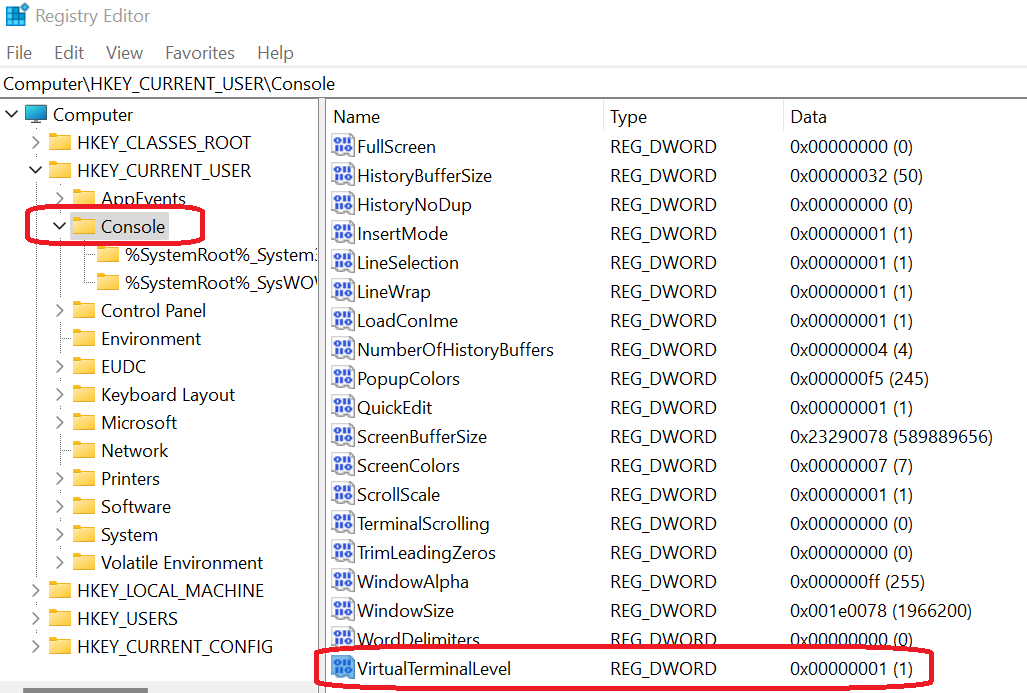
Below is what the menu option looks like in Windows 11, in order to set a Registry Key. Once this has been set, Windows now can also show colors at the Command-Prompt.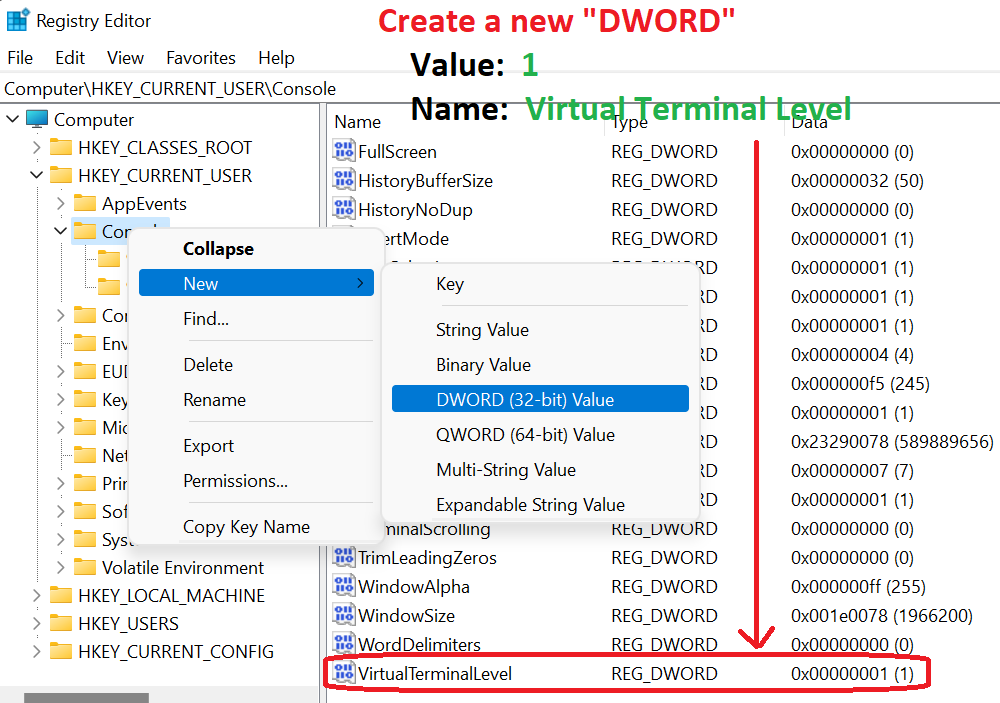
Below is some sample Java-HTML output that uses the standard ANSI Color Escape Sequences, rendered inside a typical Windows/DOS'cmd.exe'Window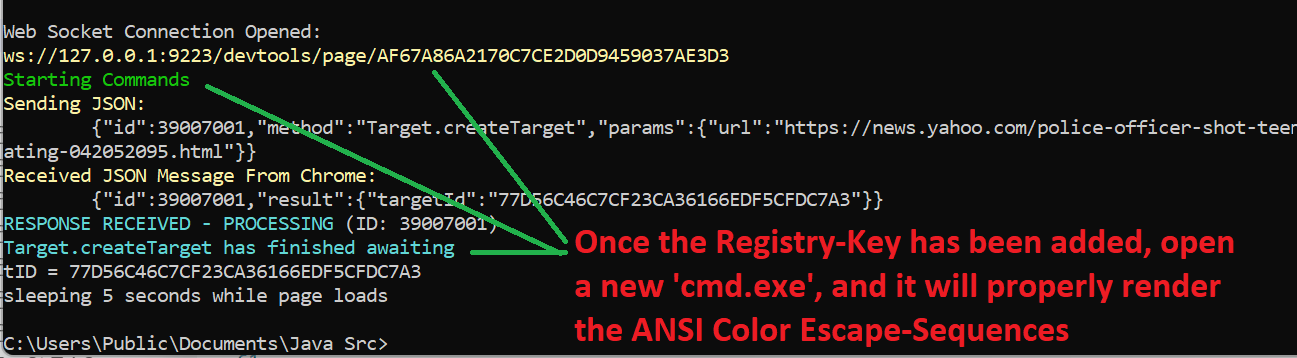
Hi-Lited Source-Code:- View Here: Torello/Java/C.java
- Open New Browser-Tab: Torello/Java/C.java
File Size: 15,323 Bytes Line Count: 333 '\n' Characters Found
Stateless Class:This class neither contains any program-state, nor can it be instantiated. The@StaticFunctionalAnnotation may also be called 'The Spaghetti Report'.Static-Functionalclasses are, essentially, C-Styled Files, without any constructors or non-static member fields. It is a concept very similar to the Java-Bean's@StatelessAnnotation.
- 1 Constructor(s), 1 declared private, zero-argument constructor
- 6 Method(s), 6 declared static
- 41 Field(s), 41 declared static, 41 declared final
-
-
Field Summary
Boolean Operating-System Indicator Modifier and Type Field static booleancolorANSIForeground, Text Colors Modifier and Type Field static StringBLACKstatic StringBLUEstatic StringCYANstatic StringGREENstatic StringPURPLEstatic StringREDstatic StringWHITEstatic StringYELLOWBackground Colors Modifier and Type Field static StringBLACK_BKGNDstatic StringBLUE_BKGNDstatic StringCYAN_BKGNDstatic StringGREEN_BKGNDstatic StringPURPLE_BKGNDstatic StringRED_BKGNDstatic StringWHITE_BKGNDstatic StringYELLOW_BKGNDBright, Bold Foreground & Text Colors Modifier and Type Field static StringBBLACKstatic StringBBLUEstatic StringBCYANstatic StringBGREENstatic StringBPURPLEstatic StringBREDstatic StringBWHITEstatic StringBYELLOWBright, Bold Background Colors Modifier and Type Field static StringBBLACK_BKGNDstatic StringBBLUE_BKGNDstatic StringBCYAN_BKGNDstatic StringBGREEN_BKGNDstatic StringBPURPLE_BKGNDstatic StringBRED_BKGNDstatic StringBWHITE_BKGNDstatic StringBYELLOW_BKGNDStop Color Sequence Modifier and Type Field static StringRESET
-
Method Summary
Convert text w/ Color-Code Sequences to HTML w/ <SPAN> Tags Modifier and Type Method static StringtoHTML(String text)static StringtoHTML(String text, boolean preFormat, boolean escapeHTMLElements, boolean useCSSClasses)static StringtoHTML(String text, String titleStr)Get a CSS-CLASS Definition for a <SPAN>-Tag from a Color-Code Sequence Modifier and Type Method static Stringspan(String charCode)Get a CSS Inline STYLE-Attribute from a Color-Code Sequence Modifier and Type Method static StringspanInlineStyle(String charCode)Retrieve CSS CLASS Definitions File as a String Modifier and Type Method static StringgetCSSDefinitions()
-
-
-
Field Detail
-
colorANSI
public static final boolean colorANSI
If Java is not running on a UNIX machine, the terminal output that contains "color" will not function. If it does not, then the Shell color commands will default to empty, zero-length strings.
WINDOWS SUPPORT:
Since Windows Release 1909, which was the 2019 Version of Windows 10, MS-DOS Command Prompt Windows will also support ANSI Color-Code Escape Sequences;- Code:
- Exact Field Declaration Expression:
public static final boolean colorANSI;
-
RESET
public static final java.lang.String RESET
- Code:
- Exact Field Declaration Expression:
public static final String RESET = colorANSI ? "\u001B[0m" : "";
-
BLACK
public static final java.lang.String BLACK
- Code:
- Exact Field Declaration Expression:
public static final String BLACK = colorANSI ? "\u001B[30m" : "";
-
RED
public static final java.lang.String RED
- Code:
- Exact Field Declaration Expression:
public static final String RED = colorANSI ? "\u001B[31m" : "";
-
GREEN
public static final java.lang.String GREEN
- Code:
- Exact Field Declaration Expression:
public static final String GREEN = colorANSI ? "\u001B[32m" : "";
-
YELLOW
public static final java.lang.String YELLOW
- Code:
- Exact Field Declaration Expression:
public static final String YELLOW = colorANSI ? "\u001B[33m" : "";
-
BLUE
public static final java.lang.String BLUE
- Code:
- Exact Field Declaration Expression:
public static final String BLUE = colorANSI ? "\u001B[34m" : "";
-
PURPLE
public static final java.lang.String PURPLE
- Code:
- Exact Field Declaration Expression:
public static final String PURPLE = colorANSI ? "\u001B[35m" : "";
-
CYAN
public static final java.lang.String CYAN
- Code:
- Exact Field Declaration Expression:
public static final String CYAN = colorANSI ? "\u001B[36m" : "";
-
WHITE
public static final java.lang.String WHITE
- Code:
- Exact Field Declaration Expression:
public static final String WHITE = colorANSI ? "\u001B[37m" : "";
-
BLACK_BKGND
public static final java.lang.String BLACK_BKGND
- Code:
- Exact Field Declaration Expression:
public static final String BLACK_BKGND = colorANSI ? "\u001B[40m" : "";
-
RED_BKGND
public static final java.lang.String RED_BKGND
- Code:
- Exact Field Declaration Expression:
public static final String RED_BKGND = colorANSI ? "\u001B[41m" : "";
-
GREEN_BKGND
public static final java.lang.String GREEN_BKGND
- Code:
- Exact Field Declaration Expression:
public static final String GREEN_BKGND = colorANSI ? "\u001B[42m" : "";
-
YELLOW_BKGND
public static final java.lang.String YELLOW_BKGND
- Code:
- Exact Field Declaration Expression:
public static final String YELLOW_BKGND = colorANSI ? "\u001B[43m" : "";
-
BLUE_BKGND
public static final java.lang.String BLUE_BKGND
- Code:
- Exact Field Declaration Expression:
public static final String BLUE_BKGND = colorANSI ? "\u001B[44m" : "";
-
PURPLE_BKGND
public static final java.lang.String PURPLE_BKGND
- Code:
- Exact Field Declaration Expression:
public static final String PURPLE_BKGND = colorANSI ? "\u001B[45m" : "";
-
CYAN_BKGND
public static final java.lang.String CYAN_BKGND
- Code:
- Exact Field Declaration Expression:
public static final String CYAN_BKGND = colorANSI ? "\u001B[46m" : "";
-
WHITE_BKGND
public static final java.lang.String WHITE_BKGND
- Code:
- Exact Field Declaration Expression:
public static final String WHITE_BKGND = colorANSI ? "\u001B[47m" : "";
-
BBLACK
public static final java.lang.String BBLACK
- Code:
- Exact Field Declaration Expression:
public static final String BBLACK = colorANSI ? "\u001B[90m" : "";
-
BRED
public static final java.lang.String BRED
- Code:
- Exact Field Declaration Expression:
public static final String BRED = colorANSI ? "\u001B[91m" : "";
-
BGREEN
public static final java.lang.String BGREEN
- Code:
- Exact Field Declaration Expression:
public static final String BGREEN = colorANSI ? "\u001B[92m" : "";
-
BYELLOW
public static final java.lang.String BYELLOW
- Code:
- Exact Field Declaration Expression:
public static final String BYELLOW = colorANSI ? "\u001B[93m" : "";
-
BBLUE
public static final java.lang.String BBLUE
- Code:
- Exact Field Declaration Expression:
public static final String BBLUE = colorANSI ? "\u001B[94m" : "";
-
BPURPLE
public static final java.lang.String BPURPLE
- Code:
- Exact Field Declaration Expression:
public static final String BPURPLE = colorANSI ? "\u001B[95m" : "";
-
BCYAN
public static final java.lang.String BCYAN
- Code:
- Exact Field Declaration Expression:
public static final String BCYAN = colorANSI ? "\u001B[96m" : "";
-
BWHITE
public static final java.lang.String BWHITE
- Code:
- Exact Field Declaration Expression:
public static final String BWHITE = colorANSI ? "\u001B[97m" : "";
-
BBLACK_BKGND
public static final java.lang.String BBLACK_BKGND
- Code:
- Exact Field Declaration Expression:
public static final String BBLACK_BKGND = colorANSI ? "\u001B[100m" : "";
-
BRED_BKGND
public static final java.lang.String BRED_BKGND
- Code:
- Exact Field Declaration Expression:
public static final String BRED_BKGND = colorANSI ? "\u001B[101m" : "";
-
BGREEN_BKGND
public static final java.lang.String BGREEN_BKGND
- Code:
- Exact Field Declaration Expression:
public static final String BGREEN_BKGND = colorANSI ? "\u001B[102m" : "";
-
BYELLOW_BKGND
public static final java.lang.String BYELLOW_BKGND
- Code:
- Exact Field Declaration Expression:
public static final String BYELLOW_BKGND = colorANSI ? "\u001B[103m" : "";
-
BBLUE_BKGND
public static final java.lang.String BBLUE_BKGND
- Code:
- Exact Field Declaration Expression:
public static final String BBLUE_BKGND = colorANSI ? "\u001B[104m" : "";
-
BPURPLE_BKGND
public static final java.lang.String BPURPLE_BKGND
- Code:
- Exact Field Declaration Expression:
public static final String BPURPLE_BKGND = colorANSI ? "\u001B[105m" : "";
-
BCYAN_BKGND
public static final java.lang.String BCYAN_BKGND
- Code:
- Exact Field Declaration Expression:
public static final String BCYAN_BKGND = colorANSI ? "\u001B[106m" : "";
-
BWHITE_BKGND
public static final java.lang.String BWHITE_BKGND
- Code:
- Exact Field Declaration Expression:
public static final String BWHITE_BKGND = colorANSI ? "\u001B[107m" : "";
-
-
Method Detail
-
span
public static java.lang.String span(java.lang.String charCode)
This will convert a UNIX 'Character Code' into an HTML Tag if it is necessary to convert UNIX colored-text into HTML.
CSS-Definitions:
This method returns an HTMLSPAN-Tag that contains an inlineCSS-CLASS. It is (hopefully) obvious that the definitiions for any / allCSS-CLASSESthat are used will need to be provided on the page.
The methodgetCSSDefinitions()will return the complete definition page for allCSS CLASSESthat are employed by this method.
You may also view the contents of the CSS Definitions Below:
Shell.C CSS Definitions- Parameters:
charCode- Any one of the 33 codes defined in this class.- Returns:
- An HTML
<SPAN CLASS=...>element that may be used as a substitute for one of the codes defined in this class. - Throws:
java.lang.IllegalArgumentException- If theStringthat is passed to parameter'charCode'is not one of the defined codes in this class.- See Also:
getCSSDefinitions()- Code:
- Exact Method Body:
 final Integer arrPos = charCodesMap.get(charCode);

 if (arrPos == null) throw new IllegalArgumentException(
     "The value passed to parameter 'charCode' is not one of the defined codes in " +
     "this class."
 );

 return htmlSpansCSSClasses[arrPos];
-
spanInlineStyle
public static java.lang.String spanInlineStyle(java.lang.String charCode)
This will convert a UNIX 'Character Code' into an HTML Tag if it is necessary to convert UNIX colored-text into HTML.
CSS Inline-Style:
This method returns an HTMLSPAN-Tag that contains an inlineSTYLE-Attribute. Remember, if you are converting large Text-String'sinto HTML using inlneSTYLE-Attributes, your output could potentially grow very large, and rather quickly.
UsingCSS-CLASSESprovided by methodspan(java.lang.String)will make your generated HTML somewhat more efficient. If you do, you must remember to import the CSS Definitions for these classes somewhere in your HTML-File.- Parameters:
charCode- Any one of the 33 codes defined in this class.- Returns:
- An HTML
<SPAN STYLE=...>element that may be used as a substitute for one of the color-codes defined in this class. - Throws:
java.lang.IllegalArgumentException- If theStringthat is passed to parameter'charCode'is not one of the defined codes in this class.- Code:
- Exact Method Body:
 final Integer arrPos = charCodesMap.get(charCode);

 if (arrPos == null) throw new IllegalArgumentException(
     "The value passed to parameter 'charCode' is not one of the defined codes in " +
     "this class."
 );

 return htmlSpansStyleAttributes[arrPos];
-
toHTML
public static java.lang.String toHTML(java.lang.String text)
- Code:
- Exact Method Body:
return toHTML(text, false, true, false);
-
toHTML
public static java.lang.String toHTML(java.lang.String text, boolean preFormat, boolean escapeHTMLElements, boolean useCSSClasses)
Converts the instances of these escape-sequences that are found inside of JavaString'sthat were generated using these ANSI UNIX color escape sequences, and produces a valid HTMLStringthat contains HTML<SPAN STYLE="color-information">replacements!
New-Line Characters:
Any new-line Character-Sequences such as'\n'or'\r\n'will be replaced with HTML<BR />elements.- Parameters:
text- This should be any string, usually one that is saved from a'StorageWriter', although any text that includes these UNIX Color Escape Codes is fine.preFormat- When this parameter receivesFALSE, everywhere in the input text-Stringthat aCRLF(new-line) occurs, that newline will be replaced by an HTML<BR />element, in addition to the original newline.
This parameter is referring to the CSS'white-space: pre'setting, which can be used. Althought, sometimes going with the plain-old-vanilla<BR />tag can also be advisable.escapeHTMLElements- Whenever HTML is sent to the input-parameter 'text' - if the intention is to render the HTML using the browser, this parameter should beFALSE. If it is intended to allow the UI to "show the HTML" like it were text-to-be-viewed, then each and every greater-than-symbol'>'and also every less-than-symbol'<'will be escaped. This is done to prevent the browser from trying to parse the text as HTML.useCSSClasses- When this parameter receivesTRUE, all returned<SPAN STYLE=...>elements shall be converted to using a simplifiedCSS Class Name. TheCLASSdefinitions for the returnedStringcan be retrieved by simply calling the method:getCSSDefinitions().
IMPORTANT: If this parameter does receive aTRUEvalue, it is imperitive to include theCSS STYLEdefinitions that are returned by the above mentioned method, or else the colors shall not be visible.
You may view the contents of the CSS Definitions Below:
Shell.C CSS Definitions- Returns:
- Every UNIX-ANSI color escape-sequence that is found/identified in this text will
be replaced with an HTML
<SPAN STYLE="color: a-color; background: a-background-color">element. - Code:
- Exact Method Body:
return TextToHTML.convert(text, preFormat, escapeHTMLElements, useCSSClasses);
-
getCSSDefinitions
public static java.lang.String getCSSDefinitions()
If the'useCSSDefinitions'option is selected with thetoHTML(String, boolean, boolean, boolean)method, then theStringreturned from this method shall provide theCSS Styledefinitions needed to use the colors provided bytoHTML(...)- Returns:
- This shall visit the internal data-files for this JAR distribution, and return a
list of
CSS Styledefinitions that will colorize the HTML produced by an invocation oftoHTML().
You may view the contents of the CSS Definitions Below:
Shell.C CSS Definitions - Code:
- Exact Method Body:
 /*
 return LFEC.readObjectFromFile_JAR
     (Torello.Data.DataFileLoader.class, CSS_DEFINITIONS_FILE, true, String.class);
 */

 return LFEC.readObjectFromFile_JAR
     (Torello.Java.C.class, CSS_DEFINITIONS_FILE, true, String.class);
-
toHTML
public static java.lang.String toHTML(java.lang.String text, java.lang.String titleStr)
Convenience Method
Creates an'.html'-file from the output produced bytoHTML(String, boolean, boolean, boolean)
Invokes:getCSSDefinitions()
And Invokes:toHTML(String, boolean, boolean, boolean)
Passes:TRUEto parameter'preFormat'
Passes:TRUEto parameter'escapeHTMLElements'
Passes:TRUEto parameter'useCSSClasses'- Code:
- Exact Method Body:
return TextToHTMLPage.convert(text, titleStr);
-
-